Smart door locks for modern doors
Your front door, unlocked the smart way.
Explore smart door locks that open with a PIN code, a fingerprint, a key card or a phone app. SmaLocks brings together real product photos and easy guides so you can picture the right lock on your own door.
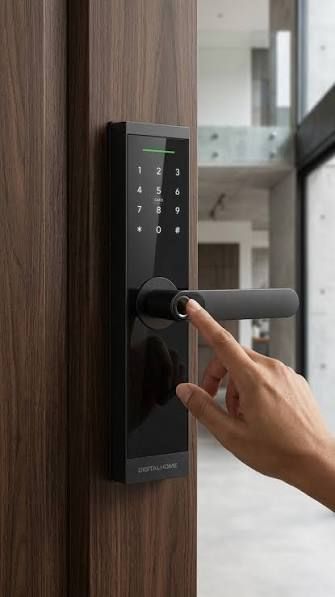
Keypad entry in action
- PIN Keypad
- Fingerprint
- Key Card
- Phone App
- Backup Key
Ways to open
Five common ways a smart door lock lets you in
Smart locks replace or support the traditional key with other ways to confirm who is at the door. Here are the entry methods you will see most often across keyless door locks.
-
01
PIN code keypad
A numbered keypad on the lock face lets you type a personal code instead of carrying a key. Many households like being able to share a code with family members.
-
02
Fingerprint reader
A small biometric sensor, often placed near the handle, reads a registered fingerprint so the door can be opened with a single touch.

-
03
Key card or tag
Card readers are familiar from offices and hotels. Holding a card or tag close to the reader is a quick way to open a shared or busy entrance.

-
04
App and display locks
Some smart locks pair with a phone app or include a small screen that shows messages and status, adding a friendly, connected feel to the front door.

-
05
Mechanical key backup
Many digital door locks still keep a traditional key cylinder as a backup, so there is another way in if the electronics are ever unavailable.

Photo gallery
Smart lock styles on real doors
From slim lever designs to tall push-pull handles, smart door locks come in many shapes and finishes. Browse the gallery, then visit the Locks page for a closer look at each style.


Before you choose
A simple checklist for picking a smart door lock
Check your door
Note the door material, thickness and whether it already has a mortise lock or a simple cylinder. This shapes which smart lock styles will fit.
Choose how you want to enter
Decide whether a PIN code, fingerprint, key card, phone app or a mix of these suits the people who use the door every day.
Think about power
Most smart locks run on batteries. Ask how the lock warns you when power is low and how it can be opened if the batteries run out.
Keep a backup plan
Look for a secondary way in, such as a mechanical key, so a flat battery or forgotten code never leaves you outside.
Plan the installation
Some locks swap in easily, while others need cutting or drilling. A professional installer can confirm the fit before any work begins.
Have a question about smart locks?
Send us an email and our team will get back to you.